top of page


Bluebeam Max is a new premium plan powered by AI and the most advanced Bluebeam technologies. Accelerate drawing reviews, automate workflows and bridge the gap between PDF and BIM.


Automate The Busy Work
Work smarter with AI-powered automation that handles tedious tasks and complex workflows. Spend less time on repetitive work so you can focus on what matters most.

See The Bigger Picture
Get big-picture clarity into complex projects with Stitching — automatically combine drawing sheets from different parts of your project into a single, continuous view.


Skip The Redraw
Use Magic Markups to instantly duplicate, offset, or convert markups with CAD-level precision. No manual redrawing required.
Talk To Your Drawings
Connect Revu to Anthropic’s Claude — Connect Revu to Anthropic’s Claude — use AI prompts to search information, add and update markups, turn markup metadata into insights, and be more productive than ever with Revu.
Get Ahead of Delays and Cost Overruns
Strengthen project confidence with AI-powered design reviews that resolve issues before they become expensive setbacks. Catch problems sooner

Catch Problems Sooner
Use Smart Review* to scan construction documents for design issues, scope gaps, and discrepancies. See insights as AI-generated markups, dashboards, and trackable issues.

Spot Changes with AI Precision
Use Smart Overlay* to detect design changes across disciplines, and drawing scales. See visual overlays, reports, and trackable comparisons that go beyond standard tools.
Bridge The Gap Between PDF and BIM
Improve communication between design teams using BIM and build teams using Bluebeam with Connected Sessions with Revit — your 2D Bluebeam markups will automatically link to the correct spot in 3D Revit.
*Smart Review and Overlay are currently in preview as Bluebeam continues to improve them. Smart Review is optimized for US-based vertical commercial construction.
Revit® is a registered trademark of Autodesk, Inc., and/or its subsidiaries. All other trademarks are the property of their respective holders.
BLUEBEAM COLLBORATION SOFTWARE
Better collaboration.
Better results.
Bluebeam construction software gives teams the flexibility to work together anywhere through design, build and handover.
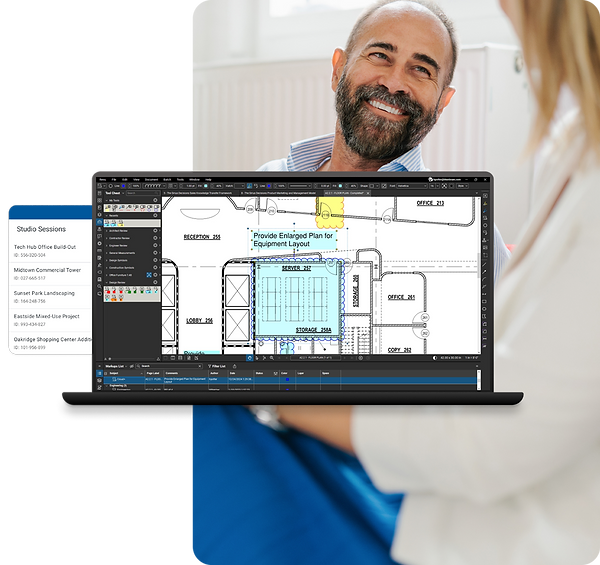
Trusted by over 3 million professionals worldwide

Why Bluebeam?

Bluebeam helps design and build professionals be more efficient, minimize errors, and constantly deliver high-quality projects.
Across industries, disiplines, and project phases, teams using Bluebeam finish their work faster and better every day

Communicate clearly
Show what you need to say with best-in-class markup and measurement tools.
-
Visually communicate with customizable markups set to drawing scale
-
Show even more by attaching snapshot images and metadata to your markups
-
Confidently measure length, depth, volume, and much more – all at drawing scale.
-
Focus on the right information by sorting, filtering, and grouping your list of markups
Collaborate effectively

Work from a single source of truth across all phases of the project with the Studio collaboration environment.
-
Avoid overlapping changes between stakeholders with check-in/out capabilities
-
Speed up feedback cycles by getting users on the same page, in real time
-
Stay on track by assigning markups to stakeholders and running status reports
-
Keep collaborators accountable with a detailed activity record of their actions
Optimize processes
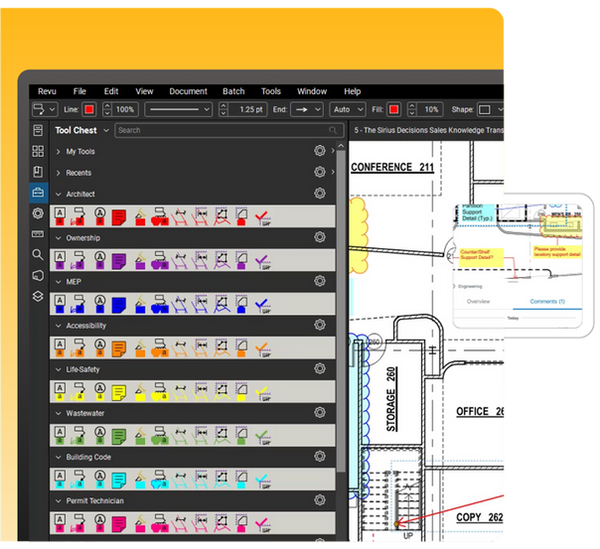
Set standards, streamline workflows, and speed up everyday tasks with process-efficiency tools.
-
Configure your user interface and Tool Chests to your project needs
-
Connect your workflows with key third-party software applications
-
Quickly locate symbols, images, or annotations with computer vision
-
Process documents in bulk with batch slipsheeting, stamping, and more
One powerful solution.

BLUEBEAM REVU
Get more done with REVU
Revu® is the essential desktop application for marking up, collaborating on, and working with PDF drawings and documents.
-
Improve communication and reduce errors with industry-standard markup and measurement tools
-
Collaborate in real time with teammates and other project contributors from anywhere in the world
-
Streamline your workflows and speed up everyday tasks with process- efficiency tools

BLUEBEAM CLOUD
Bluebeam it on the go
Bluebeam Cloud extends the powers of Revu to web and mobile so you can work from anywhere.
-
Get the latest information when you need it, where you need it
-
No need to install Revu — simply pick up and mark up on your web browser or mobile device
-
Invite anyone to collaborate on drawings in real
SUBSCRIPTION PLANS
Your work, your way
All plans include access to Bluebeam Revu for windows, desktop, Bluebeam Cloud on the web and mobile, Bluebeam University for learning, and technical support. You can mix and match plans for users with different needs
For professional-grade markups, measurements, project document management, and initiating collaboration sessions.
For maximum productivity with advanced measurements, reporting, and bulk document processing tools.
For powered by AI users who want to accelerate drawing reviews, automate workflows and bridge the gap between PDF and BIM.

Trusted by over 3 million professionals worldwide

bottom of page